• Welcome to the FREE TUGBBS forums! The absolute best place for owners to get help and advice about their timeshares for more than 32 years!

    Join Tens of Thousands of other owners just like you here to get any and all Timeshare questions answered 24 hours a day!
  • TUG started 32 years ago in October 1993 as a group of regular Timeshare owners just like you!

    Read about our 32nd anniversary: Happy 32nd Birthday TUG!
  • TUG has a YouTube Channel to produce weekly short informative videos on popular Timeshare topics!

    All subscribers auto-entered to win all free TUG membership giveaways!

    Visit TUG on Youtube!
  • TUG has now saved timeshare owners more than $24,000,000 dollars just by finding us in time to rescind a new Timeshare purchase! A truly incredible milestone!

    Read more here: TUG saves owners more than $24 Million dollars
  • Wish you could meet up with other TUG members? Well look no further as this annual event has been going on for years in Orlando! How to Attend the TUG January Get-Together!
  • Now through the end of the year you can join or renew your TUG membership at the lowest price ever offered! Learn More!
  • Sign up to get the TUG Newsletter for free!

    Tens of thousands of subscribing owners! A weekly recap of the best Timeshare resort reviews and the most popular topics discussed by owners!
  • Our official "end my sales presentation early" T-shirts are available again! Also come with the option for a free membership extension with purchase to offset the cost!

    All T-shirt options here!
  • A few of the most common links here on the forums for newbies and guests!

Official TUGBBS upgrade complaint/suggestion thread!

Status
Not open for further replies.
IMG_2093.PNG
What happened to the nice drop down list of forums? Right now it seems like I have to back out of a forum to get to the main list, and then pick the next forum I want to see.

This is my first visit since the changeover so I don't know if threads with new posts since my last visit still appear in bold. It was really nice in the old software that I could tell at a glance if anything new had been posted on a topic I was interested in.

I agree, the large fonts are not particularly nice.

All in all, the new system seems really clumsy and not very user friendly.

The link to the Quick Navigation Menu is at the right end of the Forums banner, looks like two little boxes with an arrow between them, tiny, you have to look close for it.
 
Last edited:
I don't see a forum drop down list either over at DisBoards. So if such an option exists, they haven't enabled it either. You can always click on the forums link in the upper left to be taken to a list of all the forums. But I miss the drop down too.
 
As far as I can tell, new posts are no longer since your last visit. When you read them they disappear from the New Posts page. They will remain there until you read them. You can mark a forum or all forums as read though and that will clear the page.
I noticed this separater in the New Posts page

Threads below this have not been updated since your last visit but have unread messages.

So it would seem that you can still see the new posts since your last visit above that separator. The ones below are new posts but since your last visit.
 
Can't see link to my Control Panel.
 
Can't see link to my Control Panel.
There is no Control Panel like there was in vBulletin. You can click on your user name in the upper right to access preferences and settings.
 
There is no Control Panel like there was in vBulletin. You can click on your user name in the upper right to access preferences and settings.
Gracias! Is this change really an "upgrade" or just a "change"? I liked vBulletin. :)
 
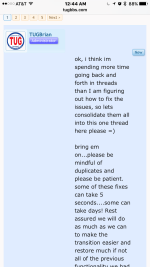
Can we go back to a smaller font? the forum is currently unreadable on my phone, with only 1-2 words per line. it was much better this morning...

just actually changed to verdana 12pt
 
I liked seeing where posters were from and which timeshares they own alongside each post. That way, when someone asks about a certain location, I know whether the advice given is from a local or a traveler. Also, if someone posts a sighting it's nice to see at a glance whether they own a timeshare that gives them priority for that exchange (i.e. Marriott or Vistana).

this is currently being worked on by doug, he mentiones how to get this data back via your profile.
 
What happened to the nice drop down list of forums? Right now it seems like I have to back out of a forum to get to the main list, and then pick the next forum I want to see.

This is my first visit since the changeover so I don't know if threads with new posts since my last visit still appear in bold. It was really nice in the old software that I could tell at a glance if anything new had been posted on a topic I was interested in.

I agree, the large fonts are not particularly nice.

All in all, the new system seems really clumsy and not very user friendly.

once you mark all forums as read, this functionality will return.
 
Gracias! Is this change really an "upgrade" or just a "change"? I liked vBulletin. :)

unfortunately neither of the two more recent versions of vbulletin (4 and 5) were very well liked by folks who upgraded and ran large forums such as ours.
 
Just wanted to say that I logged into TUG tonight for the first time since the change. Nice ~ very well done! Thanks Brian & Co.!!! ;) Good job!!!
 
I liked seeing where posters were from and which timeshares they own alongside each post. That way, when someone asks about a certain location, I know whether the advice given is from a local or a traveler. Also, if someone posts a sighting it's nice to see at a glance whether they own a timeshare that gives them priority for that exchange (i.e. Marriott or Vistana).
See this post: Resorts Owned Display
 
Last edited:
View attachment 2881

The link to the Quick Navigation Menu is at the right end of the Forums banner, looks like two little boxes with an arrow between them, tiny, you have to look close for it.

this same link is also available at the top breadcrumb line as well.
 
Is there a way to organize saved Conversations in to folders like you could do with Private Messages in vBulletin? I had some of my private messages in folders that I had created in order to keep them organized. They all transferred over in to the general Conversations section. Could get a little unruly for someone who has many that they want to save. Though I tend to delete mine as I go except for those with information that I want to save to refer back to.
 
Appears its avail thru add on only...will see what we can do.
 
Is it possible that something other than the font is affecting this? I'm up to 3 words per line, which is a bit better but not much.
 
Generally nice looking change.
I miss the TUG memory of "You Last Logged On" in your ID box at the top of the screen. Made it easy to find where I left off. I don't use "New Posts Feature".

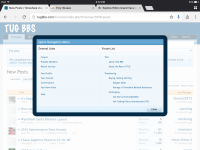
When I turned on Adobe Flash my screen format changed strangely. I have some old "tabs" internal to the forum and an iPad screen label. There is also an overlay window titled "Quick Navigation Menu" with a non-functioning "Close" button and inaccesible menu items.

I am running Firefox 49.0.1 on openSUSE Linux 13.1.
 
this same link is also available at the top breadcrumb line as well.

OK, thats a new one on me, breadcrumb line...

After fiddling with all the new features I have to say I like what you have done and how responsive you have been helping to get everyone settled in to the new home. Bravo!
 
Generally nice looking change.
I miss the TUG memory of "You Last Logged On" in your ID box at the top of the screen. Made it easy to find where I left off. I don't use "New Posts Feature".

When I turned on Adobe Flash my screen format changed strangely. I have some old "tabs" internal to the forum and an iPad screen label. There is also an overlay window titled "Quick Navigation Menu" with a non-functioning "Close" button and inaccesible menu items.

I am running Firefox 49.0.1 on openSUSE Linux 13.1.

Oh dear, I'm afraid you are looking at my iPad screenshot, its the first post on this page, thats why the close button is non-functioning. I'll edit the message and make it a thumbnail.

I would recommend you turn off flash, you dont need it and its officially dead and removed from most web sites now. It was too easy for malicious web sites to load a virus on your computer with it.
 
On the main forum page, could you (substantially) reduce the width of the column of the sub-forum names with their descriptions? Increase, by the same amount, the width of the column which shows the title of the latest post and increase the font size of the latest post title
 
Last edited:
it was increased due to a number of folks who said it was way too small, currently its at 14pt. it was originally at 12pt...i guess we can try 13?

Ok, would you give it a go and change to 13pt?

I think a major impediment when reading posts is that there is so much whitespace on the page because the avatar pictures are so large along with a lot of space taken by join date/likes received/trophy points. The content of the post is often short which leaves a lot of scrolling to do with all the whitespace due to the left hand poster information.
 
Last edited:
Another request.

This image is from a post from odyclub which is a Honda Odyssey forum. Would you be willing to incorporate the style elements from their forum? I believe it is much more functional and aesthetic.
1. A bar above each post which shows, on the left, the date and time of when the post was submitted. On the right side of the same bar, it lists the specific post number within that particular thread.
2. The same font size used for both the original quoted post and the response.

Here is the image:
31012401781_f8b61d5a01_b.jpg
 
Not sure if this has been mentioned, but the new display seems to be not optimal. The avatar takes too much space and the real message becomes so long to display. See picture here...
 

Attachments

  • image.png
    image.png
    236.8 KB · Views: 66
Ok, would you give it a go and change to 13pt?
I think that the larger font size caused more issues on smaller devices, only one or two words per line. See the image in LisaH's post above. Increasing the font size, makes matters worse.

Another request.

This image is from a post from odyclub which is a Honda Odyssey forum. Would you be willing to incorporate the style elements from their forum? I believe it is much more functional and aesthetic.
1. A bar above each post which shows, on the left, the date and time of when the post was submitted. On the right side of the same bar, it lists the specific post number within that particular thread.
2. The same font size used for both the original quoted post and the response.

Here is the image:
31012401781_f8b61d5a01_b.jpg
It looks like that forum is built on some version of vBulletin. Not sure how easy it will be for them to style XenForo to match. I do agree that the date/time header makes it clear where there is a post break.
 
I think that the larger font size caused more issues on smaller devices, only one or two words per line. See the image in LisaH's post above. Increasing the font size, makes matters worse.

I fully agree with you that we should go to a smaller font like 12pt. Currently, the site is at 14pt which is ridiculously large. But according to TUGBrian, 12pt caused too many complaints. TUGBrian suggested 13pt as a compromise but I agree that we should go back down to 12pt. The current 14pt font is simply too large for websites (like TUG) which cater to multiple form factor devices.
 
Status
Not open for further replies.
Top